A mixed-use building with a ground-floor restaurant in morning haze

Submittal review portal for architecture firms

PlumbingLightingElectricalHVAC

Every item matched to its spec. Every call yours.

Start a pilot

Design intent is spread across drawings, specs, schedules, and hundreds of pages of product data that nobody has time to trace by hand.

Intent gets lost between documents

An item is called out in a drawing note, listed on a schedule, and drawn with a legend symbol. Its requirement is in a spec section. The product the contractor picked is somewhere in hundreds of pages of product data. Checking one item means holding all of it at once, for every fixture, valve, and panel.

AI alone can't carry the stamp

Generic AI tools skim past details in a 112-sheet drawing set and scanned product data. Without a cited page behind every comment, a reviewer has to redo the check anyway.

The hours come out of a fixed fee

A single fit-out sends hundreds of pages in waves. Construction Administration is a fixed slice of the fee. The reading is not, and what slips through gets built.

Beem turns a submittal package into a list of decisions. AI does the reading, a trade expert checks every line, and your team makes the call.

Beem

AI reads. A Beem SME checks.

What Beem does

For every item, one record: what it is, where it is marked on the drawings, the basis of design or the comparable spec when none is named, and the contractor's sheet below it, with one word beside it: matches, or does not match.

Your firm

Your reviewer decides and signs

What your team does

Signs in and opens the trades in review. Works the flagged items with the drawing and the sheet on one screen. Marks each item reviewed, verifies it, sets the action to the contractor under their own name, and issues the revision with its transmittal and logs.

Why a review team can decide from Beem's record.

Every item is traced to the drawings

Beem shows where each item lives. The drawing note that calls for it, the schedule that names it, the legend symbol that proves it on the sheet, and the basis of design or spec it has to meet. The contractor's sheet sits under all of it, and your reviewer decides.

330pages

Four packages, matched and flagged in four hours.

Restaurant fit-out, matching pass log

7-daywindow

One package's contract review window, matched and flagged in four hours.

Contractor submittal report, received 09/02, due 09/09

Compare the substitution before you decide

Put the submitted product next to the basis of design, feature by feature, every value with the page it came from. When a sheet does not match, your reviewer sees how far off it is, and what would match.

FeatureBasis of designSubmittedVerdict
Flush volume
Schedule: 1.6 gpf
1.6 gpf1.28 gpfMisses spec
HandleLever, exposedLever, exposedMatch
StandardASSE 1037ASSE 1037Match
FinishPolished chromePolished chromeMatch
Illustrative comparison

A trade expert reads behind the AI

AI is fast and reads every page. A Beem SME who has worked the trade checks every match before your team sees it, and corrects what the AI got wrong.

AIReads and compiles
SMEVerifies and flags
YOUDecides

Issue the revision. The transmittal comes with it.

Rev 0, Rev 1, each one a frozen record: the transmittal PDF, the comment log, and the change log between revisions. Company profiles print on the finalized submittal, and every entry carries who decided it and for which firm.

Transmittal PDFComment log CSVChange log CSVFinalized submittalAction to contractorBy · firmRev N

What your reviewer sees.

No more hunting across sheets to validate an item. Everything is brought into one place, verified by our SMEs, for your final call. Four views of one line item, drawn from the Beem app as it is today.

1 · On the drawing: the callout, marked on 2 sheets
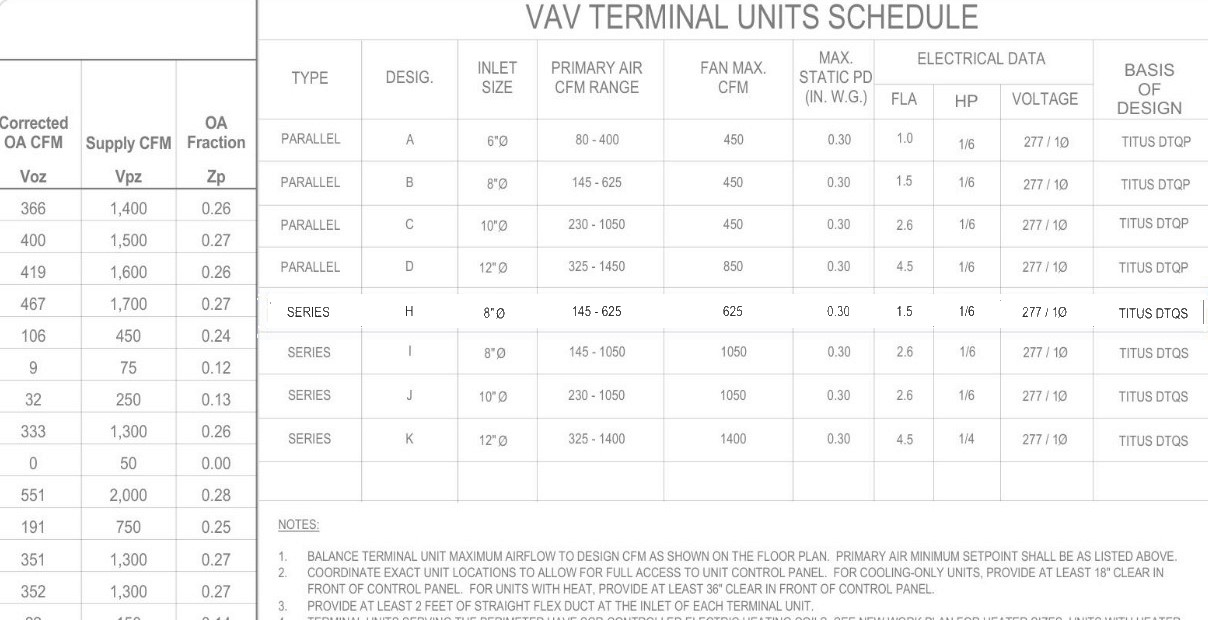
2 · On the schedule: the row that names the item
3 · In the spec: the article and the makers it allows
4 · The match, then your action to the contractor

In the portal now.

Shipped in September.

SUBMITTAL REVIEWS

Grade a package against the drawings and the spec

Every line item puts what the drawings and specifications call for next to what was submitted. Mark reviewed, verify, set the action to the contractor.

COMPARE MATERIALS

The submitted product beside the basis of design

Feature by feature, every value with the page it came from. The differences come first. Export the comparison as a PDF.

See Compare Materials →
REVISIONS

Issue Rev 0, Rev 1, with the transmittal

Every line item needs a verified sign-off before a revision goes out. The transmittal PDF, the comment log, and the change log between revisions, with company profiles on the finalized submittal.

COMPANY PROFILES

Every party on the finalized submittal

Your firm, the contractor, and the suppliers print on the issued package, with the log of who decided what.

MATERIAL TRACKING

Procurement log per trade

Owner and supplier on each line, need-by and order-by dates, a change log per row, and one Excel export.

CLOSE-OUT

Warranty documents behind the finalized submittal

Per section, each one the brand's warranty document linked from the cut sheet.

Four trades, matched and flagged in four hours.

A 200-seat restaurant fit-out sent four packages across three months: 330 pages of product data against a 112-sheet drawing set.

The line that does not move.

Beem never determines

Beem matches and flags. Every approval decision belongs to the architect or engineer of record, and the export shows who decided what.

Two lanes, kept apart

Beem writes the comment in its own lane. Your reviewer writes the decision in yours. They stay in separate fields, on screen and in the export.

Verified against the source

Every flag points at the drawing note, schedule, or legend it came from, the spec it has to meet, and the submittal sheet. Your reviewer checks the source before determining.

Sample project

200-seat restaurant fit-out, Maryland

Four packages across plumbing, lighting, electrical, and HVAC, matched and flagged before the architect's team opened them.

Restaurant interior under construction

The portal

Every item matched to its spec. Every call yours.

One record per item. Beem's comment in its lane, your action to the contractor in yours, every source one click away.

One record per item

What it is, where it is marked on the drawings, the basis of design or the comparable spec, and the contractor's sheet below it, in one column. Your reviewer decides one item at a time.

Compare Materials

Put the submitted product next to the basis of design, feature by feature, every value cited to its page, before you set the action to the contractor.

See Compare Materials →

Issue the revision

Rev 0, Rev 1, each with its transmittal PDF, comment log, and change log. Company profiles print on the finalized submittal.

A Beem SME writes the comment. Your team makes the call.

Every item has two lanes. Beem's lane holds the record and whether the sheet matches, written by a Beem trade expert after the AI's first read. Your lane holds the action to the contractor, who set it, and for which firm. The two never share a field, and the export keeps them apart.

Beem's laneWritten by a Beem SME

PL05Lavatory faucet LF-1 · Plumbing

marked on 2 sheets1/2 · p4 · plan callout2/2 · p8 · schedule rowSpec 22 40 00 · 2.1
The documents call for
Metering faucet, deck mounted, 0.5 gpm
Schedule P102e · Spec 22 40 00 · 2.1
Their sheet shows
Single-lever manual faucet, 1.2 gpm
Their sheet · S-006 · p2
Does not match

The schedule and the spec call for a metering faucet at 0.5 gpm. The sheet shows a manual single-lever faucet at 1.2 gpm. Both pages are cited on the record. Illustrative item.

Beem's lane says one of two things about a sheet, and nothing else:

MatchesDoes not match
Your laneWritten by your reviewer

Your action on PL05

Mark reviewed (R)Verify (V)Exclude (X)

Action to contractor

Action to contractor: Not set. Pick one to see what changes on the transmittal below.

This field is your reviewer's, signed with their name and firm. Beem never approves, rejects, or certifies an item. The choice above is a demo.

The row on the issued transmittal
Beem SMEPL05 · Does not match · P102e, 22 40 00 2.1, S-006 p2
Your firmAction to contractor: not set · unsigned

Matching by Beem AI, checked and commented by a Beem SME. Actions to the contractor set by your firm, each one signed by name. The two cells never share a field.

In practice

A 200-seat restaurant fit-out, four trades, matched and flagged in four hours.

Restaurant interior under construction with exposed ductwork and plumbing rough-in
Representative image. Rough-in is where a mismatched submittal becomes a change order.

Four submittal packages arrived across three months: plumbing, lighting, electrical, and HVAC. 330 pages of product data, to be checked against a 112-sheet drawing set. The contract review window on one package was seven days.

Beem's matching pass covered all four packages in four hours. Every item was traced to the drawing notes, schedule, and legend, tied to its basis of design or the spec, cited on both sides, and flagged where the contractor's sheet differed. The architect's team worked the plumbing package in about an hour and made every determination themselves.

Flagged in that pass

  • Does not matchA lavatory faucet submitted as manual against a schedule calling for automatic.
  • Does not matchA thermal expansion tank outside the basis of design temperature and pressure rating.
  • Does not matchA lavatory sink with the wrong faucet hole configuration.
  • nothing submittedSpecified items with nothing submitted against them.

Every number here has a source.

330 · 4 · 4

Pages, packages, hours.

Matching pass log

7-day

Review window, 09/02 to 09/09.

Contractor submittal report, received 09/02, due 09/09

4 checks

Drawing notes, schedule, legend, and the contractor's sheet against the basis of design or the spec.

Every item, by method

About Beem

What gets built should be what was drawn.

We make Construction Administration profitable again.

Who we work for

Principals and CA leads at small and mid-size firms

Firms where the same few people carry every active project through CA, and every hour of reading comes out of a fixed fee.

How we work

AI reads, people verify

Beem AI traces each item through the drawings and ties it to its basis of design or the spec. A Beem SME checks every match and cites the drawing, the spec, and the sheet. Your reviewers verify against the source and decide. The professional judgment layer stays where it is today.

Belief

What gets built should be what was drawn.

Company

We make Construction Administration profitable again.

Method

AI does the reading. A trade expert checks every line. Your team makes the call.

Product

Every item matched to its spec. Every call yours.

Authority

We flag it. You decide it.

Paid pilot

Bring one active project. We match and flag it before your team logs in.

  • Send the submittals, drawings, and spec. You don't have to connect or configure anything.
  • Beem AI reads the drawings, the spec, and the package, and traces every item to what the drawings call for.
  • A Beem SME verifies each match and cites the drawing, the spec, and the sheet on every flag.
  • Your reviewers take their trades and decide every item in the portal.
  • Issue the revision. The transmittal PDF, comment log, and change log come with it.

* Required

What happens to your documentsWe use your drawings, spec, and submittals to run your pilot. Ask for them back, or ask us to delete them, at any point.
No spam. We reply by email to set up the pilot.

We flag it. You decide it.

Is this just AI?

No. AI does the reading and the first match, because no person can read every page of every package in time. A Beem SME who has worked the trade checks every match before your team sees it, and your team makes every determination.

Are you reviewing our submittals for us?

No. Beem matches items to your project documents and flags what does not line up. Your reviewers make every determination inside the portal, under their own name, and the export shows who decided what.

How is this different from software we would run ourselves?

Platforms hand you a tool and a setup project. Beem hands you a project already matched and flagged, in an environment built for your team to finish it. There is nothing to configure and nothing to wire.

What if the AI or a Beem SME gets something wrong?

A Beem SME checks every AI match before your team sees it. Every comment cites the drawing, the spec, and the submittal sheet it came from. Your reviewer verifies against the source before determining. The professional judgment layer stays where it is today.

We already have a review process.

Keep it. Beem replaces the hunting, not the deciding. The transmittal and logs come out of the same issue step you would do anyway.

Who can see what?

Your team sees the whole project. Every action carries the name and firm of the person who set it.

Compare Materials

Is it the same product in the ways that matter?

When a contractor submits a different product from the one your documents name, Beem puts the two cut sheets side by side, one feature at a time, with what your documents call for beside them. Every value is checked against the page it came from. Your reviewer decides.

Simulated screen, drawn from the Beem app as it is today. Products and values are illustrative.

What your documents call for

The schedule row, the spec article, and the notes for this item, quoted from your documents. If your documents do not say it, it is not on the screen.

The basis of design

The product your drawings, schedules, or spec book name. Beem pulls the manufacturer's cut sheet for it and reads each feature with its page.

The submitted product

The pages the contractor sent for this item. Beem reads them for the same features, so the two sheets line up row for row.

The differences that decide the row come first.

A reviewer holding a substitution reads the differences before the matches. Beem lists them worst first, each as a sentence with both values and their pages, and the requirement they were judged against. Every row on the screen carries one of these words.

Against what the documents require

Both miss

The documents set a requirement and neither sheet meets it. A question for the designer as well as the contractor.

Misses spec

The documents set a requirement. The basis of design meets it. The submitted product does not.

Against the basis of design

Falls short

Worse than the basis of design in the direction that matters: a lower rating, a narrower range, a shorter warranty.

Differs

Different from the basis of design, and neither better nor worse can be said.

Exceeds

Better than the basis of design in the direction that matters.

Match

The same value, allowing for units, rounding, or another name for the same standard or material.

One sheet only

Not stated

The submitted sheet never mentions it. Ask the contractor.

Check page

The sheet mentions it and the read did not settle a value. Open the page and look.

Only theirs

Only the submitted sheet states it. The basis-of-design sheet is silent on it.

Every value on screen was read from a page and checked against it.

The pairing of features is a model's judgment. The values are not. A value shows only after it is found on the page it cites. A requirement shows only if it matches a line in your documents. A numeric requirement is judged on its numbers, and a sheet that is silent is never read as failing.

On the record

Open the page behind any value

Open any row to see the words each value was read from, quoted and highlighted, with a link to that page of the sheet. Your reviewer checks the source, the same as on every review record.

Out of date

If either sheet changes, the compare says so

A new package page or a new cut sheet marks the old read out of date, with one action: compare again. Every run carries who ran it and when.

From a difference to the transmittal in one click.

One click by your reviewer, or by the Beem SME on the trade, adds a difference to the item's comments as the sentence on screen, values and pages included. Send it to the general contractor or keep it internal. The transmittal prints only what was sent to the GC. The action to the contractor stays in your lane.

1 · Add to comments

The sentence as it reads on screen

“Inlet connections: both miss. Maker A TMV-100: 3/8 in compression (p.1); Maker B MV-38: 3/8 in compression (p.2). The documents say ‘cold connection 1/2 in; hot connection 1/2 in’.” That line goes into the comment thread as written. Illustrative products.

2 · Send to the GC, or keep it

Audience is set per comment

A comment sent to the GC prints on the transmittal. An internal note never leaves your team. Comments cannot be edited, and each one keeps who wrote it and when.

3 · Export PDF

The comparison as a sheet

Who is being compared, every feature side by side, then the differences that decide the row, each with its pages. Download it to file with the submittal or send it yourself.

The Compare Materials button appears on a row only when there is something to compare.

Condition 1

The submitted product is not the one the documents name

A different maker or a different model. The same product has nothing to compare, and the button does not appear on that row.

Condition 2

The cut sheet for the named product is on file

Beem pulls the manufacturer's cut sheet for the product your documents name. Without it there is nothing to compare against. Your reviewer runs the compare from the review board. It writes an analysis beside the row and no determination on it.

Beem lines it up. You decide it.

Does Beem decide whether the substitution is acceptable?

No. It shows where the two products part and what the documents require at each point. The action to the contractor is set by your reviewer, under their own name.

Where do the values come from?

From the two sheets, page by page. A value shows only after it is found on the page it cites. No model types a value in.

What does Both miss mean?

A requirement applies and neither sheet meets it. It is the one finding that points back at the design as well as the contractor, so it leads the list.

Can the contractor see the comparison?

Only what you send. A difference added to comments and sent to the GC prints on the transmittal. The PDF export is a download. Your team decides where it goes.

Bring one active project.

Beem AI reads it, a trade expert checks every line, and your team decides every item in one place.

Start a pilot